TCP Viewer MCP for AI Agents
TCP Viewer MCP lets an AI assistant work with captures open in TCP Viewer. You can ask for packet summaries, inspect decoded fields, export a selection, or control a live capture in natural language. In 1.18.0, MCP also manages workspace tabs and Split View, reads Overview and endpoint statistics, follows streams, and imports capture files.
MCP is a TCP Viewer PRO feature. The app runs a local bridge on 127.0.0.1 and
uses a private key that changes for each launch.
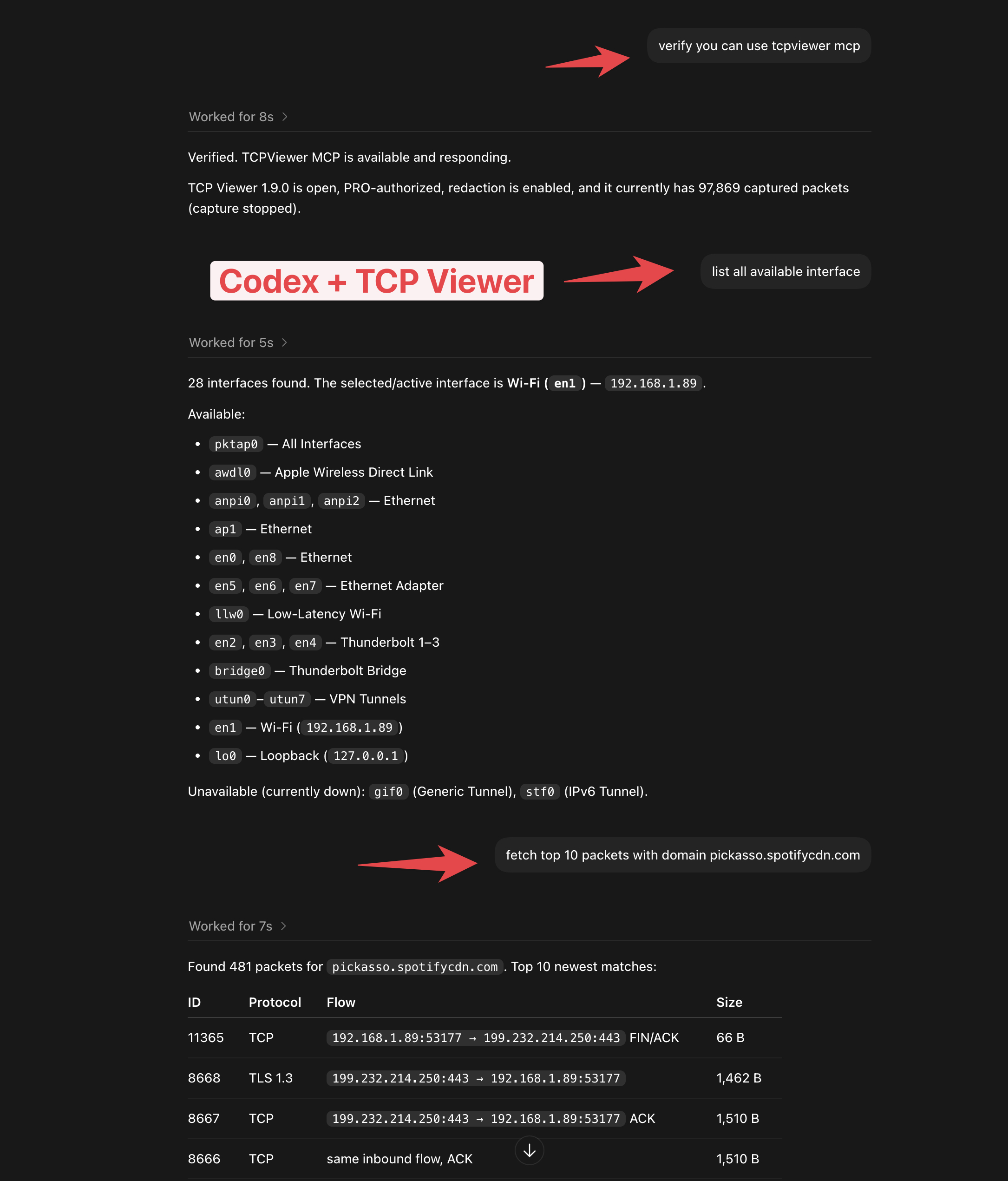
Codex checks TCP Viewer status, lists capture interfaces, and queries packets through the local MCP connection.
1. What you can do
- Query packets with filters and pagination, or summarize a capture window.
- Read decoded fields and inspect TCP, UDP, and DNS conversations.
- Create, select, reorder, and close tabs.
- Open Split View and change either pane's source, filters, and packet selection.
- Read Overview totals and endpoint statistics without opening their views.
- Start, pause, resume, or stop a live capture.
- Import capture files and export packets or TCP Viewer sessions.
- Redact sensitive values before sending decoded data to the MCP client.
2. Enable the MCP server
- Activate a TCP Viewer PRO license.
- Open TCP Viewer → Settings… → MCP.
- Turn on Enable MCP Server.
- Keep Redact Sensitive Data Before Sending to AI enabled unless you have a clear reason to send full values.
- Confirm the status shows Running on localhost.
Redaction scrubs common authorization headers, cookies, credentials, private keys, tokens, and sensitive query or body fields. Raw packet-byte access is blocked while redaction is enabled because arbitrary binary data cannot be scrubbed safely.
follow_stream still returns record metadata when redaction is enabled, but
sets payload_redacted=true and omits each record's data field. Stream
payloads require redaction to be disabled in settings.
3. Connect Codex or Claude Code
The MCP settings show a command with the exact path for your installed app. Choose a client, select Copy, paste the command into Terminal, and restart the client if needed.
For a normal /Applications install, the commands look like:
codex mcp add tcpviewer -- '/Applications/TCP Viewer.app/Contents/MacOS/tcpviewer-mcp'
claude mcp add --transport stdio --scope user tcpviewer -- '/Applications/TCP Viewer.app/Contents/MacOS/tcpviewer-mcp'
Choose Manual in TCP Viewer settings for a JSON configuration that works with other MCP-compatible clients.
After upgrading to 1.18.0, reconnect or restart your MCP client if its tool list does not show the new workspace and analysis tools.
4. Tools added in 1.18.0
| Tool | What it does |
|---|---|
list_workspaces | Lists open windows and their workspace, tab, and pane IDs. |
list_tabs | Lists live and offline tabs, their order, selected tab, and split panes. |
create_tab | Creates a live tab sharing the workspace capture. Leaves it unselected unless select=true. |
select_tab | Selects the target tab. |
move_tab | Moves a tab to a zero-based index. |
close_tab | Closes a tab with confirm=true. Closing the last tab stops capture and closes its window. |
get_pane | Reads a pane's source, filters, selected packet, view mode, and packet counts. |
update_pane | Changes only the supplied pane settings and waits for filters to apply. |
set_split_view | Enables or disables the second pane with enabled: true or enabled: false. |
focus_pane | Selects the target tab and focuses its pane. |
list_sources | Lists source IDs for apps, domains, files, and other sidebar items. |
get_overview_statistics | Returns full-source Overview totals, protocol breakdown, top apps and destinations, and timeline. |
get_endpoint_statistics | Returns endpoint totals for the complete capture or displayed pane, with search, sorting, and pagination. |
follow_stream | Reads the TCP or UDP stream containing a packet, including DNS traffic. |
import_capture | Imports PCAP, PCAPNG, or a TCP Viewer session into an offline tab. |
export_session | Exports the targeted pane's capture source as a .tcpviewsession file. |
Existing tools remain available:
| Tools | What they do |
|---|---|
get_app_status, get_capture_overview, list_interfaces | Check app and capture state, available controls, and interfaces. |
query_packets, summarize_capture, list_stream_packets | Query or summarize bounded windows of captured packets. |
get_packet_details, get_packet_bytes | Read a packet's decoded fields or a limited raw-byte range. |
export_packets, reveal_packet | Export packets to PCAP or PCAPNG, or select a packet in the app. |
start_capture, pause_capture, resume_capture, stop_capture, clear_packets | Control capture and clear packets. Clearing requires confirm=true. |
get_capture_overview reports capture status and controls.
get_overview_statistics returns the analysis shown in the Overview dashboard.
5. Target a workspace, tab, or pane
Start with list_workspaces or list_tabs. Use the returned workspace_id,
tab_id, and pane_id values to target capture, packet, export, and analysis
commands. You can supply only the ID you need, such as a pane_id.
When IDs are omitted, commands use the current selection. Explicit targets let
you read or update another tab or pane while leaving the selected tab and
focused pane unchanged. Use select_tab, focus_pane, or reveal_packet when
you intend to change what is selected. Imports have their own selection rules,
described below.
Invalid, closed, or inconsistent IDs return an error. Replacing an imported tab keeps its tab ID but creates new pane IDs, so discover the panes again afterward. Live tabs and split panes share their capture; capture controls affect that shared data.
The following examples are MCP tools/call parameter objects. Replace UUID
placeholders with discovery results and packet IDs with values from a query.
{
  "name": "list_workspaces",
  "arguments": {}
}
{
  "name": "list_tabs",
  "arguments": {
    "workspace_id": "WORKSPACE_UUID"
  }
}
{
  "name": "set_split_view",
  "arguments": {
    "tab_id": "TAB_UUID",
    "enabled": true
  }
}
Call list_tabs again to discover the second pane's ID before targeting it.
6. Change pane filters and query displayed packets
Use list_sources to find exact source IDs and get_pane to inspect current
settings. update_pane preserves fields you omit.
| Field | Values and clearing behavior |
|---|---|
source_id | An exact ID from list_sources. |
mode | packets or overview. |
display_filter | Packet text filter. An empty string clears it. |
wireshark_filter | Wireshark display expression. An empty string clears it. |
quick_filters | Protocol filter IDs. [] clears them. |
structured_filter | An and or or group with up to five rules. An empty filters array clears it. |
packet_id | An unsigned decimal string. null clears packet selection. |
endpoint | The endpoint object from a statistics row. null clears the endpoint filter. |
Quick-filter IDs are all, tcp, udp, dns, http, tls, websocket,
clientHello, serverHello, and errors.
This example sets the second pane to DNS packets:
{
  "name": "update_pane",
  "arguments": {
    "pane_id": "SECONDARY_PANE_UUID",
    "quick_filters": [
      "dns"
    ],
    "mode": "packets"
  }
}
Query the packets displayed by that pane:
{
  "name": "query_packets",
  "arguments": {
    "pane_id": "SECONDARY_PANE_UUID",
    "scope": "displayed",
    "limit": 20
  }
}
scope defaults to all. Use displayed with query_packets,
summarize_capture, list_stream_packets, or export_packets to use the
targeted pane's source selection and display filters.
Structured pane filters use a different format from packet-query filters. For example:
{
  "name": "update_pane",
  "arguments": {
    "pane_id": "SECONDARY_PANE_UUID",
    "structured_filter": {
      "operator": "and",
      "filters": [
        {
          "query": "urlDomain",
          "condition": "contains",
          "text": "example.com",
          "is_enabled": true
        }
      ]
    }
  }
}
7. Read Overview and endpoint statistics
Use get_overview_statistics for the complete capture source. It returns
totals, time range, protocol use, top apps and destinations, and a timeline
without opening Overview. It does not apply the pane's display filters.
{
  "name": "get_overview_statistics",
  "arguments": {
    "tab_id": "TAB_UUID"
  }
}
get_endpoint_statistics supports apps, domains, ipv4, ipv6, tcp,
and udp groups. It defaults to all packets, Apps, bytes descending, and
50 rows. Use search, sort, order, offset, and limit to narrow results.
{
  "name": "get_endpoint_statistics",
  "arguments": {
    "pane_id": "SECONDARY_PANE_UUID",
    "scope": "displayed",
    "group": "udp",
    "sort": "bytes",
    "order": "desc",
    "limit": 50
  }
}
Results include totals, group counts, next_offset, and an endpoint object
on each row. Pass that object unchanged to update_pane.endpoint to show the
row's related packets in a pane. Endpoint and source lists return at most
500 rows per page.
Analysis uses a fixed capture watermark, reported as
captured_through_packet_id and source_packet_count. New live packets do not
extend a running request. One analysis runs per capture source at a time;
closing or replacing that source cancels it. If the source changes and analysis
returns an error, retry against the current source.
8. Follow TCP, UDP, and DNS streams
Pass a packet ID to follow_stream. protocol accepts auto, tcp, or udp
and defaults to auto. DNS follows its underlying TCP or UDP stream.
{
  "name": "follow_stream",
  "arguments": {
    "tab_id": "TAB_UUID",
    "packet_id": "123",
    "protocol": "udp",
    "direction": "both",
    "encoding": "text"
  }
}
direction accepts both, client-to-server, or server-to-client.
encoding accepts text, hex, or base64. The tool reads the conversation
without opening a Follow Stream window.
Follow Stream scans at most 250,000 candidate packets and returns at most
4 MiB or 10,000 records. Use max_bytes or max_records for a smaller result.
Payload data is omitted while sensitive-data redaction is enabled.
9. Import captures and export sessions
Import one or more .pcap or .pcapng files, or one .tcpviewsession file by
itself. Paths must be absolute. An import creates and selects an offline tab
by default; use select=false to keep your current selection.
{
  "name": "import_capture",
  "arguments": {
    "paths": [
      "/Users/me/Desktop/example.pcapng"
    ],
    "select": false
  }
}
Supplying tab_id replaces that tab and requires confirm=true. Replacement
preserves the selected tab unless you also pass select=true. Export any
capture you want to keep before replacing it.
Export a capture source as a TCP Viewer session:
{
  "name": "export_session",
  "arguments": {
    "tab_id": "TAB_UUID",
    "path": "/Users/me/Desktop/review.tcpviewsession"
  }
}
Use export_packets for a filtered PCAP or PCAPNG instead. Exports require
overwrite=true to replace an existing file and reject symbolic-link
destinations.
10. Choose the right filter
| Action | Effect |
|---|---|
query_packets and other read-only queries | Search packets already captured without changing the app's filters. |
update_pane | Changes a pane's display filters over packets already captured. |
start_capture.capture_filter | Sets a persistent BPF filter that controls which future packets are collected. |
Starting a new capture clears its existing packets. A non-empty BPF capture
filter also excludes nonmatching future traffic. Explain that effect and obtain
explicit confirmation before passing confirm_bpf_filter=true. Omitting
capture_filter preserves the current BPF filter; an empty string clears it.
The toolbar shows a yellow filter indicator while a BPF filter is configured.
11. Try useful prompts
- "Summarize the last 5,000 packets by protocol and domain."
- "Find recent TLS packets for
api.example.com." - "Show the decoded details for packet 120."
- "List my tabs and show which one has Split View enabled."
- "Open Split View and show DNS in its second pane without changing the first."
- "Show the busiest UDP endpoints in the right pane's displayed packets."
- "Read the Overview totals for my imported capture without switching tabs."
- "Follow the DNS conversation containing packet 123."
- "Export DNS packets to
/Users/me/Desktop/dns.pcapng."
TCP Viewer bounds scans and responses so large captures do not create unlimited results. Ask for another page or window when you need more data.