
Easy packet capture
Simple, but powerful. Choose an interface, start recording, and keep packet capture calm even when the network is busy.
Packet capture for macOS
Explore your capture in a Mac app, with familiar Wireshark filters. TCP Viewer puts packet fields, raw bytes, and TCP conversations within a click.
Apple Silicon · macOS 15+
TShark is a terminal tool for capture, field extraction, and scripted analysis. TCP Viewer suits interactive work on Mac. Its CLI controls the desktop app, so keep TShark for jobs that need a standalone terminal analyzer. TShark manual
Simple, but powerful. Choose an interface, start recording, and keep packet capture calm even when the network is busy.
Powered by Wireshark
TCP Viewer is built on Wireshark's packet analysis engine. Explore decoded protocols, field values, and raw bytes in a native Mac interface.
TCP Viewer is distributed under GPL v2 or later, in line with Wireshark's license. See the open-source acknowledgements.
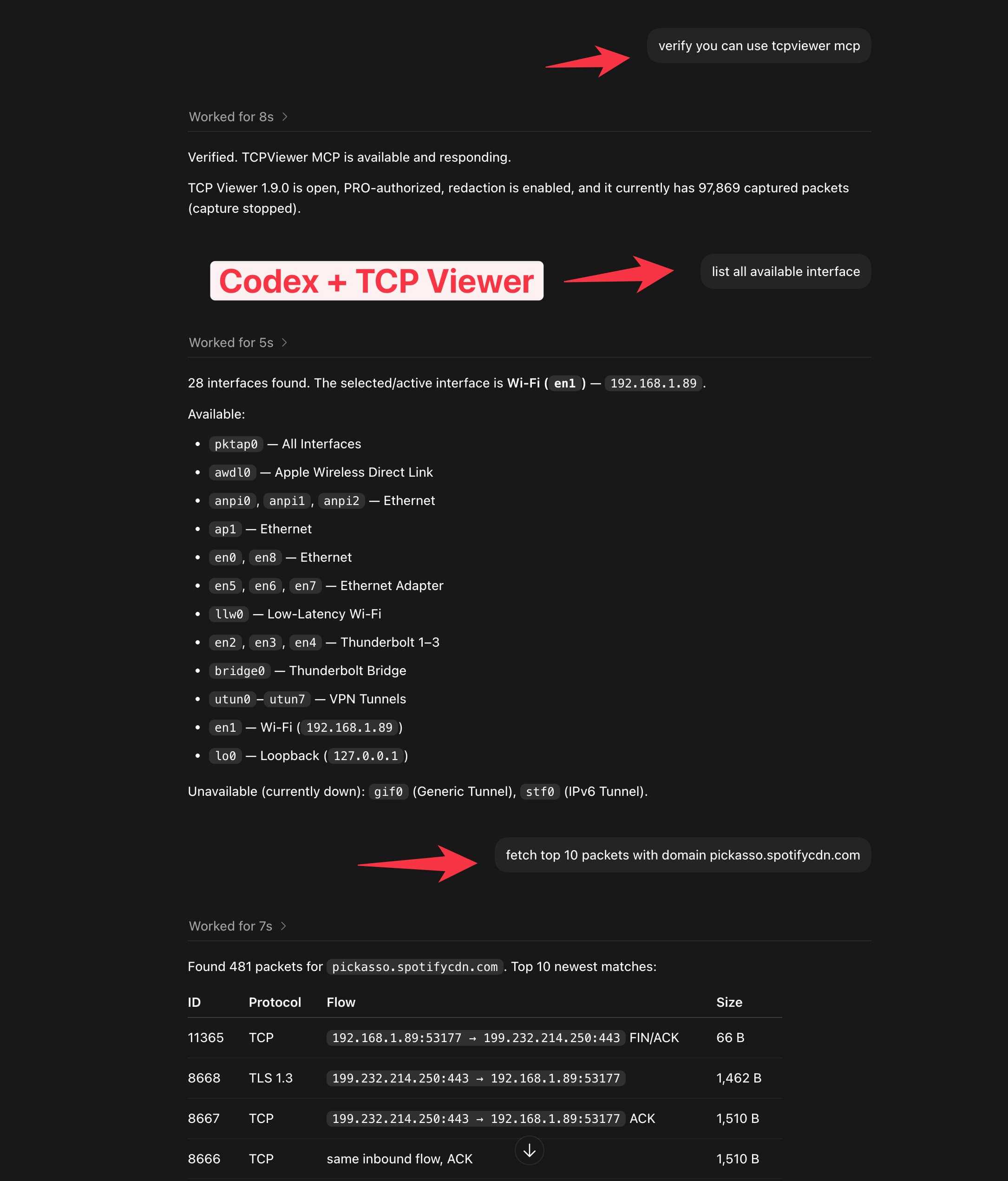
TCP Viewer MCP
Connect TCP Viewer to Codex or another MCP client. Check capture status, explore interfaces, and find the packets that matter with a plain-language prompt.
Available with TCP Viewer PRO.
Saved captures
Bring an existing capture into TCP Viewer and preview the packets right away, with no fresh recording session required.
Drag in a trace
Drop PCAP or PCAPNG files straight onto TCP Viewer.
Preview immediately
Open the packet list and decoded detail view without a live capture.
Keep the workflow native
Review saved evidence in the same Mac-first packet interface.
Drop capture.pcapng to preview
Follow TCP Stream
Get the familiar Wireshark Follow TCP workflow in a focused, Mac-native window—reassembled, direction-aware, and easy to trace back to the source packets.
Whatever you capture, TCP Viewer keeps the important traffic readable. Filter noise, open decoded fields, and save evidence for the next debug session.
Grouped traffic
Collapse busy captures into readable conversations by domain or client, then jump straight to the traffic that matters.
Protocol filters
Tap protocol chips to focus the packet list without rebuilding a complex filter every time the capture changes.
Export captures
Package the exact packets you need into standard capture files for Wireshark, teammates, or the next debug session.
Export selected packets
Capture range
File format
Filename
filtered-capture.pcapng
Packet detail
Open decoded fields, protocol trees, byte ranges, and field values with Wireshark-grade depth in a focused Mac interface.
Packet Diff
See what changed. Compare TCP or UDP packets from the same capture or different flows. Highlight changes in decoded details, or switch to hex and ASCII for the exact bytes.
Free: 2 items in the Diff pool. PRO and Team: unlimited items. Compare any two pool items at a time.
Overview
Know what happened before you open a packet. See packets and throughput over time, the protocols in use, and the busiest apps, domains, and ports. TCP Analysis flags lost segments, retransmissions, and resets.
Works with live captures and opened PCAP and PCAPNG files. Select a row to open its packets.
TCP Viewer command line
Start a capture, query matching traffic, follow TCP streams, and export PCAP files from a shell script.
Included with TCP Viewer. Normal CLI commands do not require PRO.
tcpviewer-cli / Terminal
$ CLI="/Applications/TCP Viewer.app/Contents/MacOS/tcpviewer-cli"$ "$CLI" capture start --interface en0 --bpf 'tcp port 443'{
  "schema_version": 1,
  "request_id": "7f3e2b1c-45a6-4789-b012-3456789abcde",
  "ok": true,
  "command": "capture.start",
  "data": {
    "action": "start_capture",
    "bpf_capture_filter_action": "set",
    "completed": true,
    "previous_packets_cleared": true
  }
}$ "$CLI" packets list --protocol TLS --client Safari --limit 3 --pretty
Wireshark display filters
Paste a Wireshark display filter into TCP Viewer. It shows the packets that match and does not change your capture.
Try this filter
tcp.port == 443 and ip.addr == 192.168.1.10Shows port 443 traffic for one IP address.
Wireshark display filter demo
Wireshark filter
tcp.port == 443 and ip.addr == 192.168.1.10Apply3 matching packets
Open source
Read, build, modify, and share TCP Viewer under GPL v2 or later. Paid plans activate PRO features in our signed Mac builds and include device seats, update coverage, and email support without limiting your GPL rights.
A native packet viewer from the team behind Proxyman.
6+ years
The Proxyman Team has spent more than six years building network debugging tools.
800,000+
Developers worldwide use Proxyman, built by the same team as TCP Viewer.
GPL v2+
Read the source, build the app, or contribute on GitHub.
Native
Made for Apple Silicon Macs running macOS 15 or later.
3
Proxyman, Tiny Shield, and TCP Viewer come from the same team.

Get started
Download the app and see if it fits your packet workflow.