
Easy packet capture
Simple, but powerful. Choose an interface, start recording, and keep packet capture calm even when the network is busy.
TCP Viewer vs mitmproxy
TCP Viewer captures and decodes packets. mitmproxy intercepts and changes application traffic. Compare which workflow fits the problem you are debugging.
Download TCP Viewer for MacOnly Apple Silicon - macOS 15+
Side-by-side
These tools overlap in network debugging, but they operate at different layers and are often useful together.
Area
TCP Viewer
mitmproxy
Native macOS
TCP Viewer
Designed and built for macOS 26, with a Mac-first look and feel that is easy to use every day.
mitmproxy
Offers console, command-line, and browser-based interfaces. Local Capture supports macOS, but the UI is not a native Mac app.
Capture all interfaces
TCP Viewer
Capture activity across all available network interfaces in one place, so important traffic is less likely to be missed.
mitmproxy
Supports regular proxy, Local Capture, WireGuard, and other modes. Traffic is routed through mitmproxy instead of recorded as network frames.
Detailed packets
TCP Viewer
Built on top of Wireshark, so you get familiar, Wireshark-grade packet details in a native Mac app.
mitmproxy
Focuses on interceptable flows and request or response content, not a Wireshark-style protocol tree for every packet.
Display by apps / domains
TCP Viewer
Groups traffic by app and domain, turning a busy capture into clearer conversations to scan.
mitmproxy
Organizes intercepted flows by host. Its view is request and response oriented rather than a packet list grouped by application.
Advanced filters
TCP Viewer
Build focused multi-rule filters in a clear form, so everyday checks do not require complex filter syntax.
mitmproxy
Uses powerful flow filter expressions for intercepted traffic.
TCP Viewer MCP
TCP Viewer
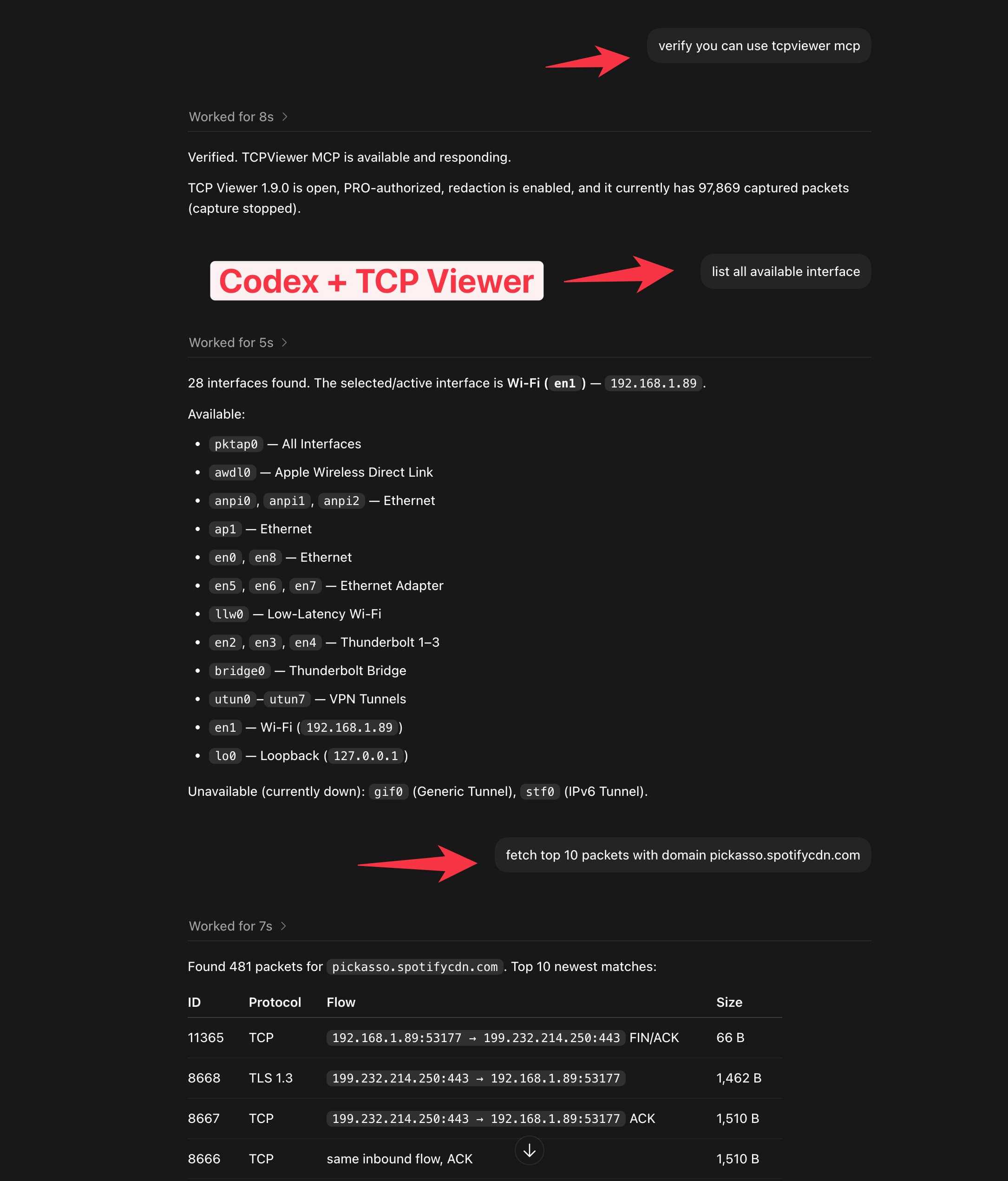
Connect Codex or another MCP client to check capture status, explore interfaces, and find packets with a plain-language request. Available with TCP Viewer PRO.
mitmproxy
The core mitmproxy tools do not include a built-in MCP server.
Choose by workflow
Start with the layer you need to inspect. Packet capture and HTTP interception solve different problems.
Use mitmproxy when you need readable or editable application data. Use TCP Viewer beside it when you need the packet path, handshakes, retransmissions, DNS, or traffic that is not represented as an HTTP flow.
Simple, but powerful. Choose an interface, start recording, and keep packet capture calm even when the network is busy.
Powered by Wireshark
TCP Viewer is built on Wireshark's packet analysis engine. Explore decoded protocols, field values, and raw bytes in a native Mac interface.
TCP Viewer is distributed under GPL v2 or later, in line with Wireshark's license. See the open-source acknowledgements.
TCP Viewer MCP
Connect TCP Viewer to Codex or another MCP client. Check capture status, explore interfaces, and find the packets that matter with a plain-language prompt.
Available with TCP Viewer PRO.
Saved captures
Bring an existing capture into TCP Viewer and preview the packets right away, with no fresh recording session required.
Drag in a trace
Drop PCAP or PCAPNG files straight onto TCP Viewer.
Preview immediately
Open the packet list and decoded detail view without a live capture.
Keep the workflow native
Review saved evidence in the same Mac-first packet interface.
Drop capture.pcapng to preview
Follow TCP Stream
Get the familiar Wireshark Follow TCP workflow in a focused, Mac-native window—reassembled, direction-aware, and easy to trace back to the source packets.
Whatever you capture, TCP Viewer keeps the important traffic readable. Filter noise, open decoded fields, and save evidence for the next debug session.
Grouped traffic
Collapse busy captures into readable conversations by domain or client, then jump straight to the traffic that matters.
Protocol filters
Tap protocol chips to focus the packet list without rebuilding a complex filter every time the capture changes.
Export captures
Package the exact packets you need into standard capture files for Wireshark, teammates, or the next debug session.
Export selected packets
Capture range
File format
Filename
filtered-capture.pcapng
Packet detail
Open decoded fields, protocol trees, byte ranges, and field values with Wireshark-grade depth in a focused Mac interface.
Open source
Read, build, modify, and share TCP Viewer under GPL v2 or later. Paid plans activate PRO features in our signed Mac builds and include device seats, update coverage, and email support without limiting your GPL rights.